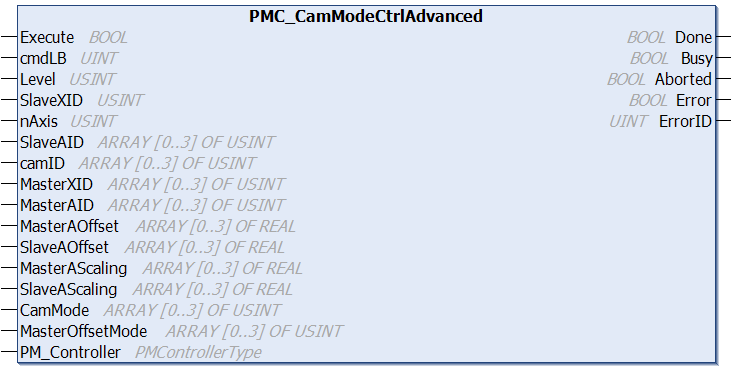
ID of the XBot. Real XBot IDs [1,78]. Virtual XBot IDs [100,127]
nAxis
USINT
# of slave axis specified in this command (all for the same slave XBot)
SlaveAID
USINT[0..3]
Array of size 4, enter up to 4 axis of the slave XBot to control. Axid IDs: 0 = no axis, 1 = X, 2 = Y, 3 = Z, 4 = RX, 5 = RY, 6 = RZ
camID
USINT[0..3]
Array of size 4, ID of the cam used to drive the slave axis
MasterXID
USINT[0..3]
Array of size 4, ID of the Master XBots
MasterAID
USINT[0..3]
Array of size 4, axis ID of the master XBot axis that is used to drive the slave xbot axis. Axid IDs: 0 = no axis, 1 = X, 2 = Y, 3 = Z, 4 = RX, 5 = RY, 6 = RZ
MasterAOffset
REAL[0..3]
Array of size 4, offset of each master axis in meters (m)
SlaveAOffset
REAL[0..3]
Array of size 4, offset of each slave axis in meters (m)
MasterAScaling
REAL[0..3]
Array of size 4, scaling factor of each master axis, positive value only
SlaveAScaling
REAL[0..3]
Array of size 4, scaling factor of each slave axis, positive value only
CamMode
USINT[0..3]
Array of size 4, cam mode of each axis Cam modes: 0 = auto start, 1 = cyclic, 2 = start once
MasterOffsetMode
USINT[0..3]
Array of size 4, master offset mode of each axis Master offset modes: 0 = absolute, 1 = relative
PM_Controller
PMControllerType
Data structure that specifies which PMC to connect to. There should be only 1 instance of this variable for each connected PMC.
Outputs
Name
Data Type
Description
Done
BOOL
Execution successful. Function block is finished. (Note: Done will not become TRUE if Execute is already FALSE)
Busy
BOOL
Function block is active and must continue to be called.
Aborted
BOOL
Command aborted by another command.
Error
BOOL
If there is an error in processing the command, then Error = TRUE, otherwise, FALSE.
STOP_CAM (0): stop the cam operation; START_CAM (1): start the cam operation
slaveXbotID
int
ID of the XBot. Real XBot IDs [1,78]. Virtual XBot IDs [100,127]
axisCount
int
# of slave axis specified in this command (all for the same slave XBot)
camAxisData
class[]
For each slave xbot axis driven by a cam, provide:
MasterXID: XBot ID of the master XBot
MasterAxisID: axis of the master XBot to follow
SlaveAxisID: axis of the slave XBot to drive
CamID: ID of the cam trajectory to use
CamMode: cam mode of the axis (0 = auto start, 1 = cyclic, 2 = start once)
MasterAxisScaling: scaling factor of master axis, positive value only
SlaveAxisScaling: scaling factor of slave axis, positive value only
MasterAxisOffsetM: offset between the start of master axis and the specified origin point, in meters
MasterAxisOffsetMode: in absolute mode, the origin position of the cam master axis is the same as the system origin. In relative mode, the origin position of the cam master axis is the same as the current position of the master XBot when the cam was activated
SlaveAxisOffsetM: offset between the start of slave axis and the specified origin point, in meters
The specified XBot(s) will enter the Motion State.
Description
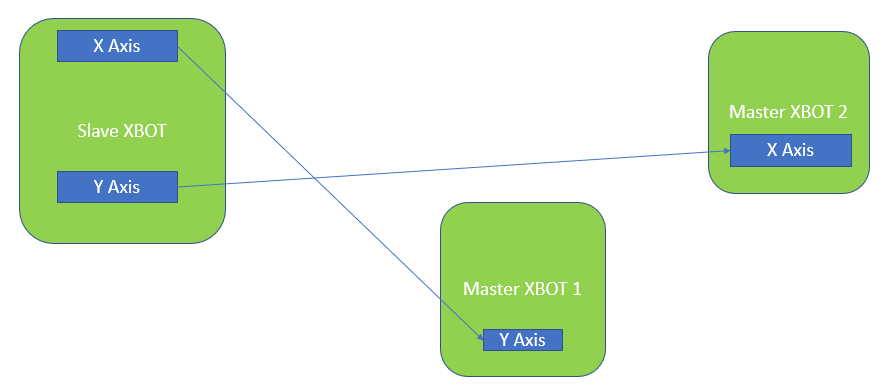
Cam operation can make 1 or more axis of the slave XBot follow the motion of 1 more axis of 1 or more master XBots.
It is not necessary to follow the same axis (you can use the Y axis motion of the master XBot to drive the X axis motion of the slave XBot
The way the slave XBot axis follows the master XBot axis is user defined in a text file, please see Cam Configuration instructions
Behaviour During Obstacles
If the slave XBot encounters an obstacle (i.e. another XBot is in the way) while following a cam, it will stop following the master and go to the Stopped State. Its motion will not be resumed even if the obstacle XBot is moved away.