
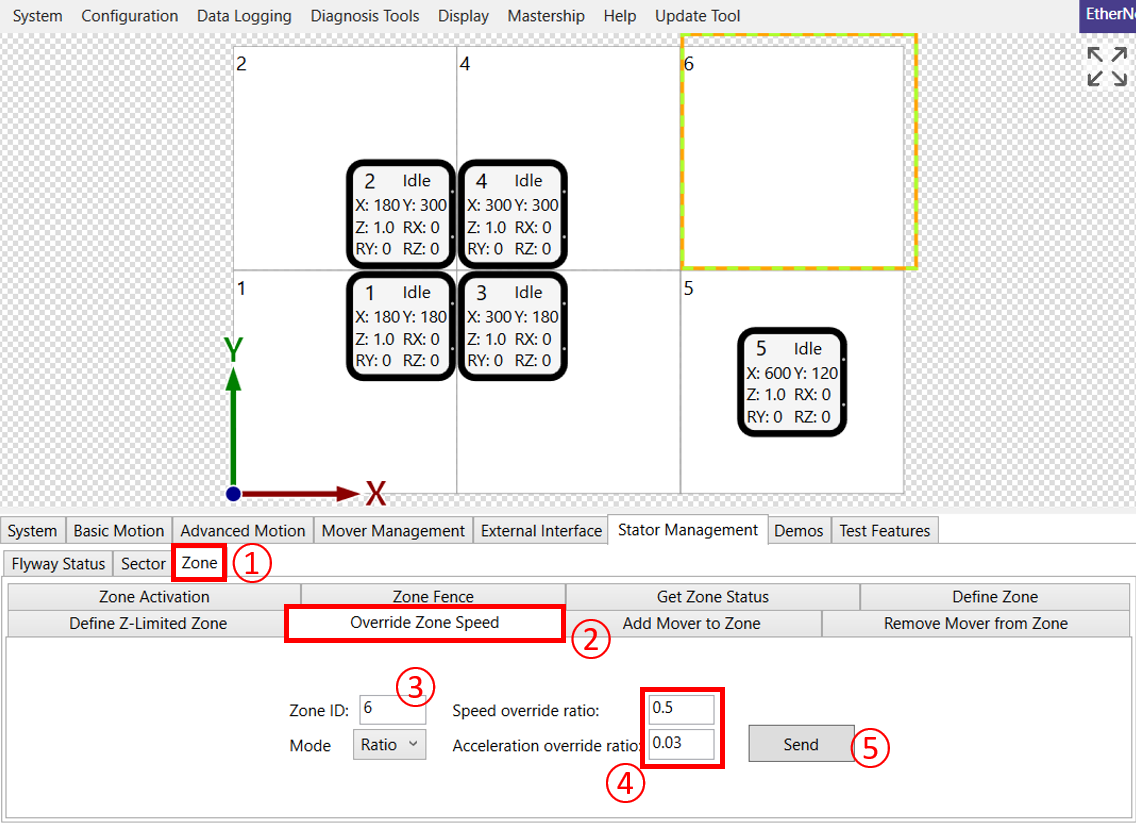
① Click the Stator Management \ Zone tab
② Click the Override Zone Speed sub tab
③ Enter the Zone ID of the zone to modify
④ Enter the override ratio for the zone
-
Speed: 0 - 2
-
Acceleration: 0.001 - 2
⑤ Click "Send Command" when ready
Note:
-
This command is used to override the speed and acceleration used by XBots in a zone.
-
Zone IDs and boundaries correspond to the respective Flyway IDs and boundaries by default, unless defined otherwise by Define Zone
-
Instead of ratio, you can also enter absolute limits for the speed and acceleration override values by choosing the appropriate Mode
-
If the speed of the mover exceeds the speed override limit when the mover enters the zone, it will decelerate at the command deceleration rate, up to override acceleration limit.
-
If there is an obstacle, the emergency deceleration limit will be used, regardless of the override acceleration limit.