Configure Digital Input To Reset DO
Use a Digital Input to turn off a Digital Output configured using the Configure Digital Output from PMC command. See Send Digital Input to PMC
Fieldbus Interface
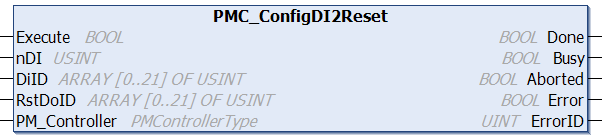
PMC_ConfigDI2Reset
Inputs
|
Name
|
Data Type
|
Description
|
|
Execute
|
BOOL
|
Execution of the function block begins on a rising edge of this input. |
|
nDI
|
USINT
|
Number of digital inputs to configure, 1 to 22
|
|
DiID
|
USINT[0..21]
|
Digital Input ID, valid range [1,128] |
|
RstDoID
|
USINT[0..21]
|
Digital Output ID, valid range [1,128], of digital output to reset (turn off)
|
|
PM_Controller
|
PMControllerType
|
Data structure that specifies which PMC to connect to. There should be only 1 instance of this variable for each connected PMC. |
Outputs
|
Name
|
Data Type
|
Description
|
|
Done
|
BOOL
|
Execution successful. Function block is finished. (Note: Done will not become TRUE if Execute is already FALSE) |
|
Busy
|
BOOL
|
Function block is active and must continue to be called. |
|
Aborted
|
BOOL
|
Command aborted by another command. |
|
Error
|
BOOL
|
If there is an error in processing the command, then Error = TRUE, otherwise, FALSE. |
|
ErrorID
|
UINT
|
0x0: All OK. Otherwise, please see Fieldbus Reply Codes. |
Conditions
|
Operating Conditions
|
|
Preconditions
|
None
|
|
Postconditions
|
Specified Digital Inputs is set to turn off the specified Digital Outputs
|
Description
Use a Digital Input to turn off a Digital Output configured using the Configure Digital Output from PMC command.
Event triggered Digital Outputs can only be turned off using this command.