
Skip table of contents

Activate Safety Sector

This command is used to activate a Safety Sector by activating the Flyways located within that Safety Sector. 

An activated Safety Sector will have a fence built around it to block XBots from entering or leaving the Safety Sector until the Recover Safety Sector command is called.

The xbots inside the safety sector will remain deactivated until the Recover Safety Sector command is called or Recover Accident Xbot command.

Auto Driving and Auto Driving Velocity commands cannot be used in an Active_Fenced Safety Sector.
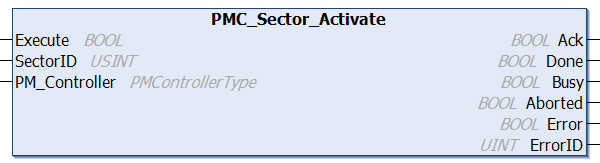
Fieldbus Interface

PMC_Sector_Activate

Inputs

Name

Data Type

Description

Execute

BOOL

Execution of the function block begins on a rising edge of this input.

SectorID

USINT

ID of the Safety Sector to activate  

PM_Controller

PMControllerType

Data structure that specifies which PMC to connect to. There should be only 1 instance of this variable for each connected PMC.

Outputs

Name

Data Type

Description

Ack

BOOL

Command has been accepted by the PMC when Ack = TRUE.

Done

BOOL

Execution successful. Function block is finished. (Note: Done will not become TRUE if Execute is already FALSE) 

Busy

BOOL

Function block is active and must continue to be called.

Aborted

BOOL

Command aborted by another command.

Error

BOOL

If there is an error in processing the command, then Error = TRUE, otherwise, FALSE.

ErrorID

UINT

0x0: All OK. Otherwise, please see Fieldbus Reply Codes.

Ethernet Interface

PMCRTN SectorControl(int sectorID, SECTOROPERATION sectorOperation)

Parameters

Name

Type

Description

sectorID

int

Sector ID (>0)

sectorOperation

SECTOROPERATION enum

Enum for specifying either that the sector should activate (ACTIVATE_SECTOR) or deactivate (DEACTIVATE_SECTOR)

Returns

Name

Type

Description

PMCRTN

PMCRTN enum

ALLOK (0): Command Accepted. Otherwise, please see Ethernet Reply Codes.


Conditions

Operating Conditions

Preconditions

The specified Safety Sector is in the Inactive state.
The STO is not triggered and flyways are connected to power source.

Postconditions

The specified Safety Sector enters the Activating state.
The flyways belonging to the sector are activated.
The xbots inside the Safety Sector will remain in accident state.

Description

This command is used to activate a Safety Sector by activating the Flyways located within that Safety Sector. 

An activated Safety Sector will have a fence built around it to block XBots from entering or leaving the Safety Sector until the Recover Safety Sector command is called.

The xbots inside the safety sector will remain deactivated until the Recover Safety Sector command is called or Recover Accident Xbot command.

Auto Driving and Auto Driving Velocity commands cannot be used in an Active_Fenced Safety Sector.

Typical workflow for powering up a Safety Sector that is currently off

  1. Turn on power to Flyways in the Sector.

  2. Get Safety Sector Status until it is in the "Inactive_Fenced" state.

  3. Activate Safety Sector to activate Flyways inside the Safety Sector.

  4. Get Safety Sector Status until it is in the "Active_Fenced" state.

  5. Recover Safety Sector to remove the fence around the Safety Sector and recover the xbots.


JavaScript errors detected

Please note, these errors can depend on your browser setup.

If this problem persists, please contact our support.