
Diagnostics logs can be downloaded using the Planar Motor Tool. The procedure is outlined below:
-
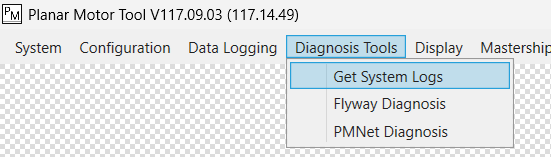
Select the “Diagnosis Tools” menu, then “Get System Logs”
-
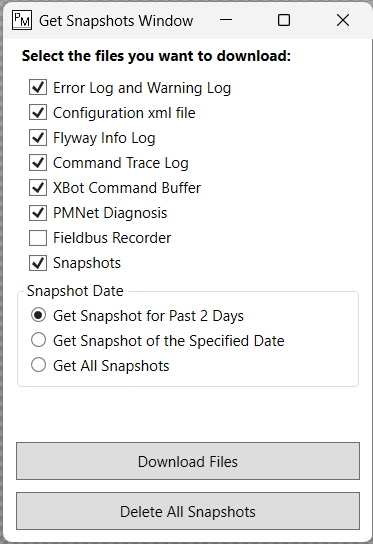
Download the appropriate logs; please see the section below for information about each log
-
After downloading the necessary snapshots, it can be helpful to then “Delete All Snapshots” stored on the PMC, so that the next download is faster.
Available Diagnosis Data
In most cases, downloading the default set of Diagnosis Data is sufficient. In case more granular control is preferred, please see the detailed description of each option below.
|
Name |
Description |
|---|---|
|
Error Log and Warning Log |
This is the same as the error and warning logs directly available from the Diagnostics Info menu at the bottom right of the PMT. See Diagnostic Using Planar Motor Tool |
|
Configuration xml file |
This downloads the current PMC configuration, and the current mover reference positions, in 2 separate .xml files |
|
Flyway Info Log |
Downloads the serial number, firmware, and data version of every Flyway in the system. It is helpful to always download the Configuration xml file with the Flyway Info Log |
|
Command Trace Log |
A text file based trace of the last 3000 commands sent to the PMC |
|
XBot Command Buffer |
The remaining commands in each XBot’s buffer |
|
PMNet Diagnosis |
Results of PMNet Diagnosis at the time the info is downloaded, same as the tool that is accessed from the menu below: 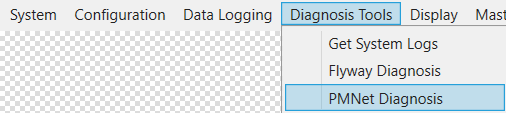
|
|
Fieldbus Recorder |
Downloads the results of the fieldbus recording. See: Fieldbus Snapshot Capture |
|
Snapshots |
Contains system diagnostics info captured during hardware failures, such as XBot drops or system shut downs |