
Mobility Control

This command can be used to control the mobility mode of an XBot.
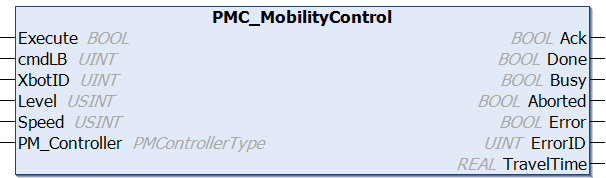
image-20260831-210216.png

Fieldbus Interface

PMC_MobilityControl 

Inputs

Name

Data Type

Description

Execute

BOOL

Execution of the function block begins on a rising edge of this input.

cmdLB

UINT

Any 2 byte Command Label, user defined.

XbotID

UINT

ID of the XBot. 0 = All XBots. Real XBot IDs [1,78]

Level

USINT

  • 0: Disable

  • 1: Land

  • 2: Levitate

Speed

USINT

0 = (1/16), 1 = (1/8), 2 = (1/4), 3 = (1/2), 4 = (max speed)

PM_Controller

PMControllerType

Data structure that specifies which PMC to connect to. There should be only 1 instance of this variable for each connected PMC.
Outputs

Name

Data Type

Description

Ack

BOOL

Command has been accepted by the PMC when Ack = TRUE.

Done

BOOL

Execution successful. Function block is finished. (Note: Done will not become TRUE if Execute is already FALSE) 

Busy

BOOL

Function block is active and must continue to be called.

Aborted

BOOL

Command aborted by another command.

Error

BOOL

If there is an error in processing the command, then Error = TRUE, otherwise, FALSE.

ErrorID

UINT

0x0: All OK. Otherwise, please see Fieldbus Reply Codes.

TravelTime

REAL

Time needed for the motion to complete in seconds

Conditions

Operating Conditions

Preconditions

XBot(s) is Idle, Stopped or Landed

Postconditions

XBot(s) will be Disabled, Landed or Idle (levitated), as specified

Description

This command can be used to control the mobility mode of an XBot.

Using Level = 0 disables the XBot, leaving it fully uncontrolled. It will not hold position and may not avoid collisions. Use this setting only when strictly necessary, and ensure the surface is clear before doing so.

Changelog

PMC v117.27.14 (Fieldbus v6.03.063.00) - Command released in fieldbus libraries