
Measure Moment of Inertia

Starts and runs a single-axis inertia measurement on an XBot. This block reports progress only — read the measured value afterwards with Query Moment of Inertia, or use Measure Moment of Inertia Async to get the value on the same block.
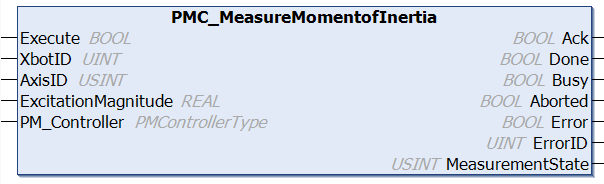
image-20260724-224451.png

Fieldbus Interface

PMC_MeasureMomentofInertia

Inputs

Name

Data Type

Description

Execute

BOOL

Execution of the function block begins on a rising edge of this input.

XbotID

UINT

ID of the XBot. Real XBot IDs [1,78].

AxisID

USINT

Axis to measure: 0 = X, 1 = Y, 2 = Z, 3 = Rx, 4 = Ry, 5 = Rz

ExcitationMagnitude

REAL

Excitation strength (N for X/Y/Z, Nm for Rx/Ry/Rz). 0 = Controller default. Capped at 10 N (linear) / 1 Nm (rotational).

PM_Controller

PMControllerType

Data structure that specifies which PMC to connect to. There should be only 1 instance of this variable for each connected PMC.
Outputs

Name

Data Type

Description

Ack

BOOL

Command has been accepted by the PMC when Ack = TRUE.

Done

BOOL

Execution successful. Function block is finished. (Note: Done will not become TRUE if Execute is already FALSE) 

Busy

BOOL

Function block is active and must continue to be called.

Aborted

BOOL

Command aborted by another command.

Error

BOOL

If there is an error in processing the command, then Error = TRUE, otherwise, FALSE.

ErrorID

UINT

0x0: All OK. Otherwise, please see Fieldbus Reply Codes.

MeasurementState

USINT

Progress state of the measurement:

  • 0: Idle

  • 1: In progress

  • 2: Done

  • 3: Failed

Conditions

Operating Conditions

Preconditions

  • XBot is in the Idle State, at a consistent location

  • No other measurements for Moment of Inertia is currently taking place

Postconditions

XBot is unlocked and results can be fetched on success

Description

Starts and runs a single-axis inertia measurement on an XBot. This block reports progress only — read the measured value afterwards with Query Moment of Inertia, or use Measure Moment of Inertia Async to get the value on the same block.

The XBot will be locked for the duration of the measurement, i.e., motion commands will not be accepted by the XBot while running this command


Recommended usage:

  1. Confirm the target XBot is idle

  2. Set XbotID, AxisID, and ExcitationMagnitude (0 for the default), then raise Execute. Keep calling the block while Busy is true

  3. On Done the measurement succeeded; on Error it failed — read ErrorID for more details

  4. Read the result with Query Moment of Inertia

Changelog

PMC v117.27.14 (Fieldbus v6.03.063.00) - Command released in fieldbus libraries